
Pharmacy rizz update
I will give an update on my pharmacy education website project. What have I added to it and what have I learned. I discovered another cool free API. It’s basically a database on the medications that the FDA has information about. I’ve created pages that let me create and edit cards. And I’ve given up on the idea of completely randomly generated sigs.
Second Experience fetching from and API
What led me to Open FDA API? I had a schema for a card which included a generic name, brand name, use, and dea class of a medication. These came from a list that I found of the top 200 drugs. I wanted to expand this to include form and route of administration. You can update the schema but this won’t automatically update the documents. So how do I do that?
My first thought to expand my schema and update all of the cards was to do this by hand. I did a few and ended up learning a little about how to use the mongodb shell. (findbyidandupdate, findoneandupdate, $set). After doing a few I thought there has to be a better way. So I reached out to some acquaintances I met at a coding meetup. They all suggested I look for a database online. Googling led me to the Open FDA API, a drug database run by the FDA.
The Open FDA API was my second experience using a third party API. While I was happy to find this free resource which had everything I needed and more, it was a little frustrating to use, it wasn’t so straight foward, unlike the namefake api. One reason for this was that the entries weren’t completely uniform, that is they didn’t have all the same key value pairs, there was a lot of nesting. This was particularly difficult when trying to check if something was a controlled substance or not. Some had that info and others didn’t and when they did it wasn’t always presented the same way. So while at first I thought I could recreate the whole deck of cards using the open fda data, I soon realized that was easier said than done.
What I ended up doing was creating a deck that grabbed only the parts I needed that I didn’t have in my original deck which was form and route of administration. Those two things were pretty consistent, that is you could look in pretty much the same place and it would be there. So to do this I created a collection of entries for each drug from the original collection. I did this like so:
const drugList = await Card.find(); // we call up the deck that I’ve already created. We query each drug in the deck
const numDocs = await Card.countDocuments();
let missingList = []; // if the query in openfda gives us nothing we store here to later query at products.active_ingredients.name:
let missingList2 =[]; // if the missingList check gives us back something it goes here and i’m probably fckd. actually no. i can do them by hand
for(let i =0; i<numDocs; i++){
console.log(‘checking drug ‘, drugList[i].generic, ‘ ‘, drugList[i].brand);
const response = await fetch(`https://api.fda.gov/drug/drugsfda.json?search=openfda.generic_name:${drugList[i].generic}`);
const response2 = await response.json();
So basically what I’m doing here is storing my original deck in drugList. I get the length of the deck which I use I as the limit of my for loop. In each loop I call openfda looking for the generic name of the current card in the deck. I learned that if it’s found at openfda.generic_name. It might be found at products.active_ingredients.name. And if it wasn’t found at either of those I would just do it by hand. There were only 3 or 4 leftover out of 200 cards.
I then created a new card object from my old deck and the route and form found in the new deck like so:
async function createMergedDeck(){
/*https://stackoverflow.com/questions/53747498/template-literal-in-mongodb-query-with-mongoose
how to query template literal. You have to use [] outside of the “ backticks but inside the curly braces
*/
const cards = await Card.find();
const numCards = await Card.countDocuments()
let mList = [];
for(let i = 0; i<numCards; i++){
const generic = cards[i].generic
const brand = cards[i].brand
const use = cards[i].use
const dea_class = cards[i].dea_class
console.log(‘drug to search’, brand)
const currentDCard = await DetailedCard.findOne({[`${generic}`] :{$exists: true}})
if(currentDCard){
const form = currentDCard[`${generic}`][0].products[0].dosage_form;
const route = currentDCard[`${generic}`][0].products[0].route;
const mergedCard = {
generic : generic,
brand : brand,
use : use,
dea_class : dea_class,
form : form,
route : route
}
await MergedDeck.create(mergedCard);
You can see how deeply nested everything was in this line here currentDCard[`${generic}`][0].products[0].dosage_form.
How do you generate a random sig?
So after I had my new deck I decided to continue working on the random sig problem. A sig is the directions for how to take a medication. It’s an abbreviation of the latin word “signa” which means label. After much thought I realized a sig could be broken down like so:
`${action} ${quantity} ${form} ${route} ${rate} time(s) ${timePeriod}`;
An action is a verb like take, inhale, inject, apply. Quantity is how much of a medication for instance 30 tablets. Form can be tablet, capsule, inhaler, cream, patch. Rate would be something like once, twice, three times. Time period would be daily, weekly, monthly.
Form and route is built in to the new deck. In the first version I created everything else is generated randomly from a list of possible options that I created for each thing. For instance action is chosen in a switch statement based on the form.
One problem that I soon noticed was that the random list of quantities that I put didn’t fit every medication. The list was 30, 60, 90 which is very common for tablets but doesn’t work for inhalers. Another problem was that the list I created for the time period didn’t fit all the medications. While some medications can be taken daily or every other day some are taken once a week or biweekly.
So I decided to just create a custom sig for those few medications that don’t fit in the random sig function that I created.
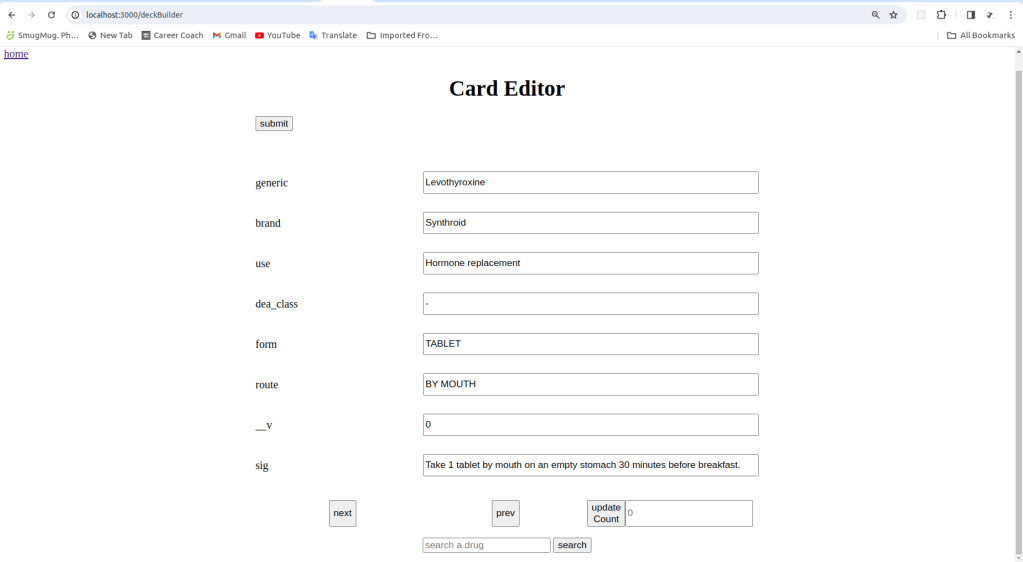
Card Creator/Editor
So again I started practicing my mongo shell skills to start editing the cards, but then again I thought there has to be a better way. Why don’t I create an interface to edit/create. And I say create cards because I noticed that the top 200 list isn’t sufficient because it doesn’t contain a good number of medications that I see on a daily basis at my job as a pharmacy tech. I plan to add maybe 50 more medications.
And for these apps I decided to try to use chatgpt for coding advice, primarily for how to implement search. To start I just implemented a counter like I did for the flashcard app to iterate through the deck and edit them. Now to display a card I decided to generate it dynamically using javascript. I wanted to do it this way because I believe in the future I may continue to expand the schema to include more properties about a medication such as mechanism of action. I did this like so:
async function renderForm(searchedCard){
const response = await fetch(‘http://localhost:3000/deckBuilderData’)
const cardDeck = await response.json();
const deckLen = cardDeck.length;
const card = pickCardValue(cardDeck,searchedCard,counter)
const len = Object.keys(card).length;
let mForm = document.getElementById(“myForm”);
let inputRemove = document.querySelectorAll(‘label’);
let brRemove = document.querySelectorAll(‘br’);
if(inputRemove){
for(let element of inputRemove)
element.remove();
};
if(brRemove){
for(let element of brRemove){
element.remove();
}
}
for(let i = 0; i<len ; i++){
let lineBreak = document.createElement(‘br’);
let gen = document.createElement(‘input’);
let genLabel = document.createElement(‘label’);
let key = Object.keys(card)[i];
let val = Object.values(card)[i];
gen.setAttribute(‘type’,’text’)
gen.setAttribute(‘placeholder’,val)
gen.setAttribute(‘name’,key)
gen.setAttribute(‘value’, val)
genLabel.setAttribute(‘id’,key)
genLabel.textContent = key;
genLabel.appendChild(gen)
mForm.appendChild(genLabel);
mForm.appendChild(lineBreak);
}
Basically what I’m doing is fetching from my own API the card deck(mongodb collection) and for each key I’m generating an input field inside of a form and I’m setting the placeholder of each input field as the value of that key. I fill it in then on the backend it does a findByIdAndUpdate.
Now for the card creator I did the same thing but I pull a “dummyCard” from the deck. This is a card I created where all the values say dummyCard. I fill it in and submit then on the back end it does an insertOne.
Like I said I originally used a counter for editor app but I later decided I would like to be able to search instead of having to click 150 times to get to card that I want to change. Doing some googling I didn’t find anything that worked perfectly for me. I found bits and pieces of a solution. I couldn’t find a definitive answer whether to use a post or get. I then discovered req.query but didn’t find how to actually put something into it.
So I decided to try to use chatgpt for the first time for code. It gave me the following:
const query = req.query.q; // Get the search query from the request query parameters
try {
const results = await YourModel.find({ $text: { $search: query } }); // Perform the MongoDB search
res.json(results);
It gave me this for the backend. And:
document.getElementById(‘searchForm’).addEventListener(‘submit’, async (e) => {
e.preventDefault();
const searchInput = document.getElementById(‘searchInput’).value;
try {
const response = await fetch(`/search?q=${searchInput}`);
const data = await response.json();
displaySearchResults(data);
} catch (err) {
console.error(err);
}
});
This for the front end. It even gave a bit of code for displaying the result which I didn’t use.
So what’s going on here? It’s grabbing the query from the req.query body, which it then uses in search of the mongodb collection. That’s for the backend.
For the front end and event listener is used on the form, it grabs the input then puts it into a fetch. It took me an embarassingly long amount of time to figure out that q = ${blah} corresponds to the q in req.query.q.
So that’s where I’m at. Going forward things I would like to add to expand this program is a prescription short hand featur, so while you’re inputting prescriptions you’ll be able to use shorthand just like we do in the pharmacy. I would also like to add a pharmacy math module. We don’t use much math in the community pharmacy setting but it’s necessary to pass the test.
If you found value in this please like, share, and follow.
 Code in the rough