
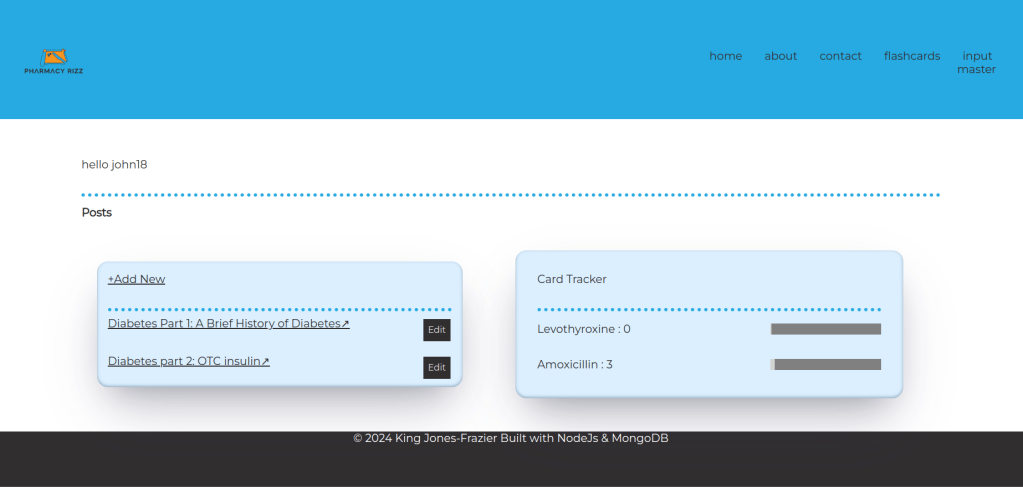
What I’ve added:
Flashcard view tracking with progress bar with the goal being 90 views. Added auth to the flashcard page so that you have to be signed in to view it.
What inspired this feature:
One thing I felt I lacked when studying to become a pharmacy tech was a way to track my progress. I never felt sure about what I should focus on, so I just ended up always studying everything all of the time. Also while studying Spanish I read somewhere that you need to see or use a word 90 times before you master it. I figure learning medication names is similar to learning vocabulary from a foreign language.
How I did it:
I added a map to the user model. So when someone registers as a new user a map of the cards is created with values set to 0. This is good for just tracking views. I think in the future I may modify this and create an array of objects instead with detailed information about each card, which would be good if someone wants to study only a certain class of medications for example.
Details:
On the front end I added an input with the value set to hidden like so
<form action=”/flashcards?_method=PUT” method=”POST” id =”myform”>
<input type=”text” name = ‘position_num’ id = ‘position’ value = ‘<%= counter.count %>’ >
<button type=”submit” value =”next” class = ‘button-48’ onClick=”beforeSub()” role=”button”>next</button>
<input type =‘text’ name=“revealed” id=“revealed” value=“hidden”>
</form>
The display is also set to hidden like so:
let revealed = document.getElementById(‘revealed’);
revealed.style.visibility=’hidden’;
When someone clicks the reveal button a javascript function runs that changes the value from hidden to ‘revealed’ like so
function cardViewTracking(){
if(revealed.value ==’hidden’){
revealed.value = ‘revealed’
}
}
That gets sent back with the form. Then on the backend in the put request there is a variable called revealedCheck.
const revealedCheck = req.body.revealed;
If it’s set to hidden nothing happens. If it’s set to reveal then I pull up the current drug from the frontend. I find it in the userProfile and increment it.
if(revealedCheck == ‘revealed’){
const currentCard = data[counter.count +1].generic;
const username = req.session.username;
const userProfile = await User.findOne({username:`${username}`});
let userViewsDeck = userProfile.cardTracker;
const currentCardViews = userViewsDeck.get(currentCard);
const updatedViews = parseInt(currentCardViews) +1;
userViewsDeck.set(currentCard, updatedViews);
await userProfile.save();
}
This was easier said than done. When there are so many different ways of doing something but not all of them work all the time depending on what technology you’re using it can be frustrating. I eventually got set() and get() to work for me. I don’t think that’s the only way to do it. And it’s probably not the best way either.
Some more about the variable that tracks if user has revealed the card. If it’s not been revealed then when they click next that doesn’t count as a view. And it only counts as a view when they click next. That can be seen as a bug to be fixed in the future.
Some more about how I changed the model. I added the following
cardTracker: {
type: Map,
of:String
}
Something to note is that mongodb doesn’t actually save this as a javascript map but just as a regular object.
How I presented everything on the frontend and created the progress bar:
async function loadCardTracker(){
async function getCardTracker(){
const response = await fetch(‘http://localhost:5000/userCardTracker’)
const cardTrackerDeck = await response.json();
return cardTrackerDeck
}
let cardTrackerDiv = document.getElementById(‘cardTrackerDiv’);
let deck = await getCardTracker();
for (const [key, value] of Object.entries(deck)) {
let card = document.createElement(‘div’);
let progressBar = document.createElement(‘div’);
progressBar.style.width = (‘200px’);
progressBar.style.height = (’20px’);
progressBar.style.backgroundColor = (‘grey’);
progressBar.classList.add(‘progressBar’);
for(let i = 0; i <= parseInt(value); i++){
let progressPoint = document.createElement(‘div’)
progressPoint.style.width = (‘2px’);
progressPoint.style.height = (’20px’);
progressPoint.style.backgroundColor= (‘lightgray’);
progressBar.appendChild(progressPoint);
}
let cardText = document.createElement(‘p’);
cardText.innerText = (`${key} : ${value}`);
card.classList.add(‘cardViews’);
card.appendChild(cardText);
card.appendChild(progressBar);
cardTrackerDiv.appendChild(card);
}
}
loadCardTracker();
Now I’m going to explain what’s happening in this code. On the backend I created a get request where you can get the users collection of card views which I call cardTracker.
router.get(‘/userCardTracker’, async(req,res)=>{
const username = req.session.username;
let userProfile = await User.findOne({username: `${username}`}).lean();
res.send(userProfile.cardTracker);
})
I use a fetch to call this from a script on the frontend. I create a loop. For each item in the map I create 2 div elements, one as the container for everything which I call card and another for the progress bar which I call progressBar, and also a p element for the text. I set the key and value of each item to the innerText of the <p> element. I then append the <p> element and the progressBar to the card element.
In the middle of this process I create a tiny div that I call progressPoint. Which gets appended to the progressBar. How many progressPoints are appended depends on the value of each item in the list. This is done with a for loop.
Thanks for reading. Please like and share/repost. Comment if you have questions or advice or would like to work on something together.
 Code in the rough